// read
- Refund guide
- 14-day guarantee
- First payment only
SocialCaptain refund: the 14-day guarantee, quoted and claimed
By Captain's Log · Checked
Yes, you can get your money back: every plan carries a 14-day money-back guarantee, and if you email within 14 days of your first payment the policy promises a full refund within 2 business days.
The catch is in two short lines. Renewal payments are not covered, and there is no partial refund for unused days outside the guarantee. This page quotes every line, gives you the address and a message to copy, and shows the dates to watch.
Short answer
- Email within 14 days of your first payment and the policy promises a full refund, no questions asked, within 2 business days.
- Only the first payment is covered. “Renewal payments are not covered.”
- Outside the guarantee there is no partial refund for the unused days of a period, so decide by day 12.
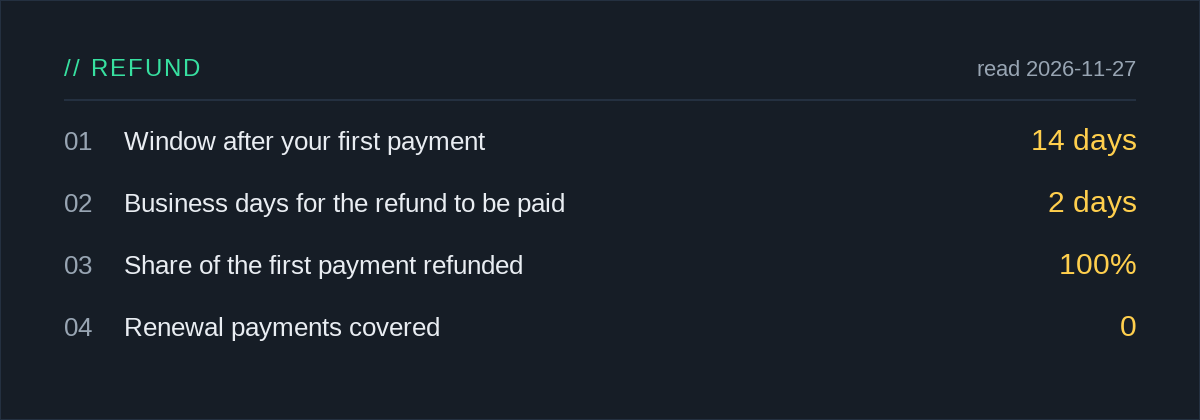
- 14 daysWindow after your first payment
- 2 daysBusiness days for the refund to be paid
- 100%Share of the first payment refunded
- 0Renewal payments covered
The guarantee, quoted word for word
The refund terms sit in two places on the official site: the pricing page and the refund policy. Here is every line that decides whether you get money back, as we read it on Nov 27, 2026.
The promise
The pricing page says: “Every plan has a 14-day money-back guarantee.” That covers both plans, Starter and Pro, and both billing options, monthly and every 6 months.
How to claim it
The same page tells you to email the support address “within 14 days of your first payment”, and promises: “we refund it in full, no questions asked, within 2 business days.” We print the address in the next section.
Three details in that sentence matter. The route is email, not a form. The clock starts at your first payment, not at sign-up or at the first follower. And the refund is in full, with no reason required.
The two limits
The first limit is on the pricing page: “Renewal payments are not covered.” The guarantee protects your first payment and nothing after it.
The second limit is in the refund policy: “We do not give a partial refund for the unused days of that period, except under the guarantee.” Outside the 14 days, a period you have paid for stays paid, even if you stop using it.
- CoveredYour first payment, in full, if you email within 14 days.
- Paid back within2 business days, as the policy states.
- Not coveredAny renewal payment, monthly or 6-monthly.
- No partial refundsUnused days of a period are not refunded outside the guarantee.
That makes the guarantee simple to use and easy to miss. It is a first-payment safety net, and the only real risk is letting the date pass.
What the policy does not say
The wording we read is short, and some common situations are not covered by it either way. Where the policy is silent, we say so rather than guess.
- Add-ons. The plans can carry four add-ons: Post boost, Engagement push, Stories push and Reels push. We have no record of whether an add-on bought on its own counts as a first payment under the guarantee.
- Upgrades. We have no record of how a move from Starter to Pro partway through a period is treated, or whether the upgrade restarts the 14 days.
- Switching billing. We have no record of what happens if you move from monthly to 6-month billing; on the wording we read, the second payment would be a renewal.
- TikTok plans. The service is a TikTok growth service as well as an Instagram one. The guarantee says “Every plan”, and we have no record of any exception for TikTok.
If any of these applies to you, ask the support team in writing before you pay, and keep the reply with your receipt. A written answer from the team is worth more than any reading of the policy, ours included.
What a no-password login means for a refund
The login is username only, and the site says: “We never ask for your password.” That keeps the refund simple. Nothing on your account has to be reset or handed back when you leave, and you never lose control of the profile while you wait for the money.
It also means the service has no way to lock you out while a refund is open. If anything about a refund request ever needs your password, treat it as a red flag, because the terms say it never should.
How to claim the refund, step by step
Step 1: find the date of your first payment
Look at your bank or card statement, or the receipt email, and note the date of the first payment. Count 14 days from it. That is your last day.
Step 2: write to the support address
The address the policy names is team@socialcaptain.com. Write from the email address you signed up with, so the team can match the message to your account without a second round of questions.
Step 3: send this message
Copy the message below, fill in the three blanks, and send it to the address above.
Subject: Refund request under the 14-day guarantee
Hello, please cancel my plan and refund my first payment in full under the 14-day money-back guarantee. My username is [username]. My first payment was taken on [date] for the amount shown on my statement, [amount]. Please confirm by reply. Thank you.
Keep the amount exactly as your statement shows it, in your own currency. Asking to cancel in the same message stops the next renewal as well, so you do not need a second email.
Step 4: keep the reply
Save the sent message and any reply. The policy promises the money “within 2 business days”, so mark the date two business days after you send and check your statement then.
If your bank takes longer than that to show the money, the reply from the support team is your record that the refund was sent. Keep it until the amount appears on your statement.
Monthly or every 6 months: how billing changes the refund
Plans bill monthly or every 6 months, and there is no free trial. The guarantee works the same way on both, but what is at stake is very different.
A worked example
Say your first payment is taken on May 4. The 14-day window runs to May 18. Send your refund email on May 16 at the latest, which leaves two days for a reply and a second request if needed.
If the support team replies on May 16 and the refund is paid within 2 business days, as the policy says, it is on its way by May 18 or soon after, depending on where the weekend falls.
Count the window in calendar days unless the support team tells you otherwise, and the payout in business days. The 2 business days skip weekends, so a request sent on a Friday may not be paid until the middle of the next week.
On monthly billing
The guarantee covers the first month. After day 14 you can still cancel, and the plan runs to the end of that month without renewing, but the month already paid for stays paid.
Your second month is a renewal, and renewals are not covered. So the largest sum you can lose after day 14 is the rest of a single month.
On 6-month billing
The guarantee covers the whole first 6-month payment, which is a larger sum to protect. After day 14 the rule about unused days applies: no partial refund for the months left in the period, except under the guarantee.
That is why 6-month billing on a first purchase is a bet that the service works for you. With no recent customer reviews to lean on, monthly billing is the safer way to find out.
| Situation | Monthly billing | 6-month billing |
|---|---|---|
| Days 1 to 14 after the first payment | First payment refunded in full | First 6-month payment refunded in full |
| Day 15 to end of first period | No refund; cancel to stop renewal | No partial refund for unused months |
| After a renewal | Renewal not covered | Renewal not covered |
Whatever you choose, put two dates in your calendar the day you pay: day 14, the end of the refund window, and the last day of your billing period, the day before a renewal.
If no reply comes, or the money does not arrive
The policy promises a refund within 2 business days, so that is the deadline to hold the team to. If it passes, act straight away and keep everything in writing.
- Reply to your own sent message, so the history stays in one thread, and add “Second request” to the subject line.
- Restate the date of your first payment, the date of your first email, and the amount on your statement.
- Ask for written confirmation that the refund has been sent, and the date it was sent.
- If two more business days pass with no answer, contact your bank or card issuer with the full email thread.
Your strongest evidence is the date of your first email. If it went out inside 14 days of the first payment, the guarantee applied on that day, whatever happens to the reply.
Why this brand deserves the extra care
The one detailed customer billing complaint we can quote dates from October 2020, on Trustpilot:
“The software worked good, but they took out four extra payments in two weeks.”
That review is six years old, and we have no record of how it was resolved. The 2026 terms are clear and written down. Still, a record of extra payments is the reason to keep every message and to read your statement after a refund is promised.
The full list of complaint patterns, and how each one resolves, is on the complaints page. How the desk weighs refund terms in its score is set out in how we score, where refund terms score 4 out of 5.
Refund or cancel: which one you need
If you are past day 14, a refund of the current period is not on offer, but cancelling still matters: it stops the next renewal. The steps are on our cancel guide.
If you are inside day 14, ask for both in one email, as the template above does. That gets the first payment back and stops the plan from renewing.
Before you buy: plan for the refund
The guarantee works best when you decide in advance what “working” means. Pick a number before you pay: a follower count by day 7, or the share of new followers who look like real people in your niche, country and language.
The service sells itself as an Instagram growth service with real Instagram followers matched to you, and the plans set daily caps of 60 on Starter and 180 on Pro. Hold it to those, and on day 12 compare what you got with what you set. Our plan breakdown lists what each tier includes.
The live terms are on the official plan page. Read them on the day you pay, in case anything has changed since Nov 27, 2026.
Refund questions, answered
How does the SocialCaptain refund work in 2026?
Email the support team within 14 days of your first payment. The policy promises a full refund, no questions asked, within 2 business days.
Do I have to give a reason?
No. The policy says the refund is given “no questions asked”.
Are renewal payments refunded?
No. The pricing page says: “Renewal payments are not covered.”
Can I get a partial refund for days I did not use?
Not outside the guarantee. The refund policy says there is no partial refund for unused days of a period, except under the 14-day guarantee.
Does the guarantee cover 6-month billing?
Yes, for the first payment. Every plan has the 14-day money-back guarantee, so the whole first 6-month payment is covered if you email within 14 days.
How long does the money take to arrive?
The policy promises the refund within 2 business days. Your bank may take longer to show it on your statement.
Is there a free trial instead?
No. There is no free trial; the 14-day guarantee on the first payment does that job.
What if nobody answers my refund email?
Send a second request after 2 business days in the same thread, with your payment date and amount. If there is still no answer, take the thread to your bank.
SocialCaptain refund policy: read the live terms
The guarantee is short and it can change. Read the live policy on the day you pay, and set day 14 in your calendar before you do anything else.
Read the refund policyPage log
- Page published. Guarantee and refund wording read on the official pricing and refund pages.