// read
- Review
- Instagram growth service
- Score 2.5 / 5
SocialCaptain reviews 2026: stale online, clear on terms
By Captain's Log · Sources read
Our verdict is 2.5 out of 5: the plans on sale in 2026 come with fair, plainly written terms, but none of the 280 Trustpilot reviews is less than a year old, the only two customer quotes we can find date from 2019 and 2020, and the Trustpilot profile now reads “temporarily closed”.
So this page does not hand you a wall of five-star quotes. It gives you the 2026 picture: what the live plan page promises today, what the old reviews actually say, and how to get your money back if the service is not for you.
Short answer
- The terms are the strong part: a 14-day money-back guarantee on the first payment, cancel any time, and a username-only login that never asks for your password.
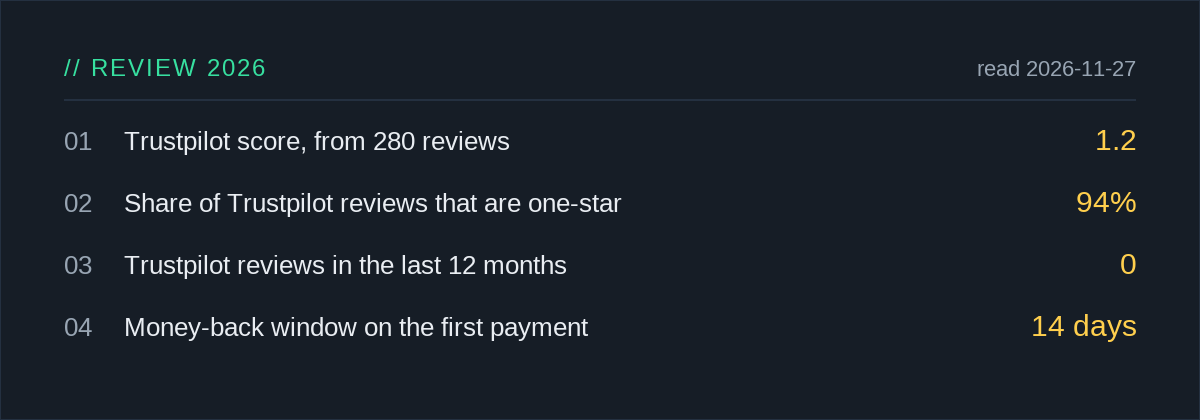
- The evidence is the weak part: Trustpilot shows 1.2 from 280 reviews, 94% of them one-star, and nothing from the last 12 months.
- Two write-ups from late 2026 call the service “retired” and “No longer sold”, yet its own pricing page still lists two plans. Read the live page before you pay.
- 1.2Trustpilot score, from 280 reviews
- 94%Share of Trustpilot reviews that are one-star
- 0Trustpilot reviews in the last 12 months
- 14 daysMoney-back window on the first payment
What SocialCaptain is in 2026, and who it suits
The desk score weighs six factors read from the sources. The terms score high and the review record scores low, which is the story of this brand in one card. The formula is published on how we score.
- Review evidence (30%)
- 1 / 5
- Complaint record (20%)
- 1 / 5
- Refund terms (20%)
- 4 / 5
- Cancel terms (10%)
- 5 / 5
- Login safety (10%)
- 5 / 5
- Claim transparency (10%)
- 2 / 5
The service sells growth for Instagram and TikTok accounts. Its homepage headline is “Real Instagram followers. Zero bots.” Capterra describes it as a done-for-you service where followers, likes and comments come from real people matched to your niche, country and language.
That makes it an Instagram growth service rather than software you run yourself. You choose a plan, give your username, and the work happens on its side. If you came here looking for Instagram automation, know that this is the done-for-you kind: you do not set up rules, schedules or bots. If you want to grow Instagram organically instead, that difference is worth knowing before you pay.
What you can buy
- InstagramFollowers, likes, comments, reel views and story views.
- TikTokFollowers, likes and views.
- iPhone appAn iPhone app is offered alongside the website.
- LoginUsername only. “We never ask for your password.”
- BillingMonthly or every 6 months. No free trial.
- Badges shown“Meta Business Partner” and “TikTok Shop Partner”.
The TikTok side makes it a TikTok growth service too, with followers, likes and views on sale. The plans on the pricing page are written around follower growth, so most buyers will judge it on the Instagram follower count.
Instagram growth tool or growth service?
The two are often mixed up, and the difference decides how much work you do. An Instagram growth tool hands you controls: you pick targets, set schedules and watch a dashboard. A growth service does that work itself and reports the result.
This one sits on the service side. Capterra’s wording is “done-for-you”, the plan page talks about targeting and a weekly strategy review on Pro, and the only thing you hand over is a username. If you want to steer every action yourself, a tool will suit you better; if you want to hand the job off, this format fits.
The two plans
Starter covers one account with “steady, real growth” of up to 60 a day and standard support. Pro is marked “Most popular” and raises the ceiling to up to 180 a day and up to 7,500 followers a month, with deeper targeting, priority support and a weekly strategy review.
Four add-ons sit on top of either plan: Post boost, Engagement push, Stories push and Reels push. The current figures for each are on the official plan page, and our plan breakdown explains what each tier includes.
Both plans bill monthly or every 6 months. There is no free trial, so the first payment is the trial, and the 14-day guarantee is what protects it.
Starter or Pro: which cap you are buying
The real difference between the tiers is the ceiling. Starter allows up to 60 a day; if that counts new followers, it is at most about 1,800 in a 30-day month. Pro allows up to 180 a day and up to 7,500 followers a month.
Those two Pro figures may not meet. If the daily cap counts new followers, a 31-day month at 180 a day tops out at 5,580, short of the 7,500 monthly ceiling. Ask the support team which limit applies to your account before you choose Pro for the monthly number alone.
The rest of the Pro list is service, not volume: deeper targeting, priority support and a weekly strategy review. If you want someone to look at your account every week, that is what the upgrade buys. If you only want a steady trickle, Starter covers it.
How the service says growth works
The claim is simple: real people, matched to you, at a capped pace. Matching runs on niche, country and language, and Pro adds deeper targeting on top. The caps are written down, so you can hold the plan to them.
A daily ceiling of 60 or 180 means growth arrives in steps rather than in one burst. That is the main practical difference between a plan like this and a one-off pack: you watch the count rise over days and can stop inside the refund window if the new accounts do not look like your audience.
The login matters as much as the pace. The site asks only for your username and says it never asks for your password, so you keep full control of the account and nothing has to be reset if you leave.
What the badges mean, and what they do not
The site shows “Meta Business Partner” and “TikTok Shop Partner” badges. It makes no claim that it uses Instagram’s official API, and we found none on the pages we read.
Read the badges as what they say and no more. If an official-API connection matters to you, ask the support team in writing before you pay, and keep the reply.
Is it a way to buy Instagram followers?
In plain terms, yes: you pay a plan fee and followers arrive. What the service claims over a cheap follower pack is that the accounts are real Instagram followers matched to your niche, delivered at a capped daily pace, with “Zero bots.”
That claim is checkable inside two weeks. Open the profiles of the new followers each day. If they look like real people in your niche, country and language, the plan is doing what it says. If they do not, you are still inside the refund window.
Who it suits
It suits a creator or small business that wants follower growth from accounts matched to its niche, does not want to hand over a password, and is happy to judge the result inside a 14-day window.
It suits nobody who needs proof from other buyers first. There is no recent customer record to lean on, so the refund window is your test. Start on the smaller plan, billed monthly, watch the first two weeks, and email for the refund before day 14 if the growth does not look real.
If your aim is to grow Instagram organically, be clear about what this is. The followers are paid for, even when they are real people matched to you. It can sit alongside your own posting, but it is paid help, not organic reach.
Who should skip it
Skip it if you need a service with a current, visible track record. With no Trustpilot review in the last 12 months and a profile marked “temporarily closed”, there is nobody recent to ask.
Skip it if you want a free trial before any payment, because there is none. And skip the 6-month billing option on a first purchase, because the guarantee covers only the first payment and gives no partial refund for unused days after it.
Skip it too if your only goal is to grow Instagram organically. Paid growth can add to good posting, but it cannot stand in for it.
What the company says about itself
The site’s own numbers are large: “since 2013”, 42,800 accounts in 44 countries, a 4.9 out of 5 rating, 84.9 million followers gained and 96.4% of followers kept after 90 days. All of them are self-published, and the kept figure appears as 97% elsewhere on the same site.
Set the 4.9 next to Trustpilot’s 1.2 and you see the whole problem with this brand online. The number the company shows and the number buyers left sit 3.7 points apart, and nothing published by customers in the last year settles which one describes the service today.
Monthly or every 6 months: which to pick
Billing choice changes your risk more than plan choice does. The guarantee covers the first payment only, “Renewal payments are not covered”, and the refund policy rules out a partial refund for unused days outside the guarantee.
On monthly billing, the most you can lose after day 14 is the rest of one month. On 6-month billing, day 15 locks in the whole period. With no recent reviews to go on, monthly billing is the safer first step.
SocialCaptain reviews: praise, complaints, rating and the way out
Here is every customer review we can quote, with the name and date as the source shows them. The list is short because the public record is short.
What customers praise
There is no fully positive customer review to print. The closest thing to praise in the record is the first half of Paul’s Trustpilot review from October 2020: “The software worked good”. The same sentence then turns into a billing complaint, shown in full below.
So the praise on this page goes to the terms, which you can read for yourself today. The 14-day money-back guarantee, the promise to refund within 2 business days, cancel at any time, and a login that asks only for your username are the parts of the offer a buyer can check before paying.
Those three things, the pricing shape with a capped daily pace, the no-password login and the cancel terms, are what we would praise in a buyer’s place. None of them depends on trusting an old review.
What customers complain about
“The software worked good, but they took out four extra payments in two weeks.”
Paul’s review is the extra-charge report: four extra payments in two weeks, on a service that bills monthly or every 6 months. It dates from October 2020, and we have no record of how it was resolved.
How that would resolve under today’s terms: a full refund of the first payment if you email within 14 days, paid within 2 business days. Renewal payments are not covered. If you see a charge you did not expect, email the support team the same day with the date and amount from your bank statement. The address and a ready-to-send message are in our refund walk-through.
“Stopped working overnight and removed all support”
The G2 review is the other quote, from June 2019, one star. A 2020 write-up on tool-busters.com reports the same thing: the service stopped working.
Both describe the product as it was six or seven years ago. What is on sale in 2026 is described as a done-for-you plan with a username-only login. The sources do not tell us whether it runs on the same system, so we do not claim it was fixed, and we do not assume it was not.
Every recurring complaint pattern, with what to do about each, is on the complaints page.
Old complaints against today’s terms
| Complaint | Year | What the 2026 terms say |
|---|---|---|
| Four extra payments in two weeks | 2020 | Full refund of the first payment within 14 days, paid within 2 business days. Renewals are not covered. |
| Stopped working overnight, support removed | 2019 | Cancel any time from the account or by email; the plan runs to the end of the paid period. |
| Stopped working (third-party write-up) | 2020 | Plan page lists two plans, four add-ons and priority support on Pro. |
The terms do not prove the old problems are gone. They do give you a written route out if the same thing happens to you, and that route is short: email within 14 days, and the policy promises the money within 2 business days.
Why the record is stale
Every profile we read is either old or empty. Trustpilot has 280 reviews and none inside 12 months. G2 has one review, from 2019. GetApp, Software Advice and SourceForge have none, Capterra’s rating could not be verified, and we found no BBB profile.
The Trustpilot profile also says “temporarily closed”, and replies there are signed by Nitreo with a note that it was formerly this brand. Our Trustpilot page sets out what that profile shows and what it does not.
What the 2026 write-ups say
- reviewsencyclopedia.com (Nov 23, 2026): Lists it as "No longer sold", rated 1.2.
- virallizedreviews.com (Oct 25, 2026): Calls it "retired".
- tool-busters.com (2020): Reports that it stopped working.
- duwama.com (Undated): Promotional write-up.
- startmakestopwaste.com (Undated): Frames it as a possible scam.
The two recent ones disagree with the official site. Reviewsencyclopedia.com, on Nov 23, 2026, lists the service as “No longer sold”. Virallizedreviews.com, on Oct 25, 2026, calls it “retired”. Yet the pricing page, read on Nov 27, 2026, lists two plans, four add-ons, a refund guarantee and cancel terms.
Either the write-ups are behind or the site is. The safe move is the same in both cases: read the live page, pay for one month, and keep the refund date in view.
How to read a 1.2 from 280 reviews
A score of 1.2 with 94% one-star means about 263 of the 280 reviews are one-star. That is a heavy verdict, and it should weigh on any buyer.
It is also an old verdict. None of those reviews falls inside the last 12 months, and the two we can quote are from 2019 and 2020. The score tells you how buyers felt about the service years ago; it tells you nothing direct about the plans on sale now.
That is why this page scores evidence and terms separately. The old record drags the score down hard. The current terms pull it back up. Neither cancels the other, and a buyer should hold both in mind. A fresh review, good or bad, would move the evidence score faster than anything else.
Red flags we checked, and what we found
- Password requestNone. Username only, in writing.
- Refund window14 days on the first payment, paid within 2 business days.
- RenewalsNot covered by the guarantee. Cancel before the period ends.
- Cancel routeFrom the account or by email, any time.
- Recent reviewsNone on any platform in the last 12 months.
- Status reportsTwo late-2026 write-ups say “retired” and “No longer sold”.
Four of the six checks come back in the buyer’s favor; two do not. The two that do not are both about evidence, and both can be tested cheaply: read the live plan page today, and pay for one month only.
What happens to the followers after you stop
The company says 96.4% of followers are kept after 90 days, and 97% in another place on its site. Both are its own figures, and no customer review we can quote confirms or disputes them.
Cancelling stops the plan from renewing, and it stays active until the end of the period you paid for. We have no record of any rule about removing followers when you leave, so the claim to watch is the kept figure, not a clawback.
How the rating breaks down
| Platform | Rating | Reviews | Newest review | State |
|---|---|---|---|---|
| Trustpilot | 1.2 | 280 | None in the last 12 months | Marked "temporarily closed"; 94% one-star |
| G2 | Not shown | 1 | Jun 6, 2019 | One review, one star |
| Capterra | Not verified (page blocked) | Not verified | Not verified | Listing exists |
| GetApp | None | 0 | None | No reviews |
| Software Advice | None | 0 | None | No reviews |
| SourceForge | 0.0 | 0 | None | Unreviewed |
| BBB | None | 0 | None | No profile found |
The desk score of 2.5 out of 5 comes from six weighted factors, shown in the card above and explained on the method page. Review evidence and complaint record score 1 each. Refund terms score 4. Cancel terms and login safety score 5. Claim transparency scores 2, because the headline numbers are self-published and one of them changes between pages.
The structured rating on this page is computed only from the reviews printed on it. Two are printed and one of them shows stars, so the computed average is 1.0 out of 5 from one rated review. We do not pad it with the company’s own 4.9.
What to watch in your first 14 days
- Day 1: note the date of your first payment and put day 14 in your calendar.
- Days 1 to 7: check that the daily pace stays inside the plan’s cap, 60 a day on Starter or 180 on Pro.
- Every day: open a handful of new followers and check they look like real people in your niche, country and language.
- Day 7: check your bank statement for exactly one payment.
- Day 12: decide. If you want out, email for the refund now, two days before the window closes.
This list does the job the missing reviews would have done. It turns the guarantee into a test you run on your own account, with your own money protected.
Five questions to ask support before you pay
- Is the service still sold to new customers? Two write-ups from late 2026 say it is not.
- On Pro, which limit applies first: 180 a day or 7,500 a month?
- How is targeting set: niche, country and language, chosen by you or by the team?
- On which date will my first renewal be charged, and how much notice will I get?
- If I cancel by email, what confirmation will I receive?
Ask in writing and keep the replies. A clear answer to all five is the best recent evidence you will find, better than anything on the review profiles, and a slow or vague answer is a reason to wait.
How to cancel
The pricing page says: “Cancel any time from your account or by email, and your plan will not renew. It stays active until the end of the period you paid for.”
- Sign in to your account and cancel there, or email the support team.
- Keep the confirmation, with its date.
- Check your next statement: no renewal should appear once the period you paid for ends.
The full walk-through, including what to do if a renewal still arrives, is on how to cancel.
Refund terms
“Every plan has a 14-day money-back guarantee.” The policy adds that you email within 14 days of your first payment and the refund comes “in full, no questions asked, within 2 business days.”
Two limits matter. “Renewal payments are not covered.” And the refund policy says: “We do not give a partial refund for the unused days of that period, except under the guarantee.” So the guarantee is a first-payment safety net, not a refund for any month you stop using.
Put day 14 in your calendar the day you pay. That one step is what turns the guarantee from a promise into money back, and it costs nothing.
A worked example: pay on March 1 and the window runs to March 15. Email on March 13, not on the last evening, so a slow reply cannot push you past it. If the refund lands within 2 business days, as the policy promises, the money is back before the window would have closed.
If you are on 6-month billing, the same window applies to the whole first payment. That is a larger sum to protect, which is one more reason to decide by day 12 rather than day 14.
SocialCaptain reviews: 8 questions answered
Are SocialCaptain reviews still current in 2026?
No. The newest Trustpilot review is more than 12 months old, the only G2 review is from June 2019, and GetApp, Software Advice and SourceForge have none. Judge the service on its current written terms and on your own first 14 days.
Is it legit?
It is a live service with a published plan page and refund policy, both read on Nov 27, 2026. What it lacks is a recent customer record, so treat the 14-day guarantee as your safety net. Our legit check walks through every signal.
Does it ask for my Instagram password?
No. The login is username only, and the site says: “We never ask for your password.”
How do I get a refund?
Email the support team within 14 days of your first payment. The policy promises a full refund within 2 business days, no questions asked. Renewal payments are not covered.
Can I cancel at any time?
Yes, from your account or by email. The plan does not renew and stays active until the end of the period you paid for.
Is there a free trial?
No. Plans bill monthly or every 6 months, with no free trial. The 14-day money-back guarantee on the first payment does the job a trial would.
Why is the Trustpilot profile closed?
The profile shows “temporarily closed” and gives no reason we can quote. It holds 280 reviews averaging 1.2, none from the last 12 months. More on our Trustpilot record.
Does it work for TikTok as well as Instagram?
Yes. On TikTok it sells followers, likes and views. On Instagram it sells followers, likes, comments, reel views and story views. An iPhone app is offered too.
SocialCaptain alternatives, in our working order
Seven services come up as the usual alternatives. We list them in the order of our working list, not by merit: we have not scored them, and we print no facts about them that we have not read. Each name links to its own site, and the full page is 7 alternatives compared.
Before you switch, put the same four questions to any of them that this page puts to the service it reviews. Does it ask for your password? How long is the refund window, and does it cover renewals? Can you cancel online? Is there a customer review from the last 12 months?
Two head-to-heads go further: versus Kicksta, and versus Nitreo, which matters here because the Trustpilot replies are signed by Nitreo. The raw figures behind every page are on the data page.
SocialCaptain reviews read: now check the live terms
The terms are the best part of this offer, and they are short. Read the plan page, note day 14 of your first payment, and judge the growth on your own account.
Read the plan pagePage log
- Page published. Sources read: the official homepage, pricing and refund pages; Trustpilot, G2, Capterra, GetApp, Software Advice and SourceForge profiles; five third-party write-ups.